Blog Posts

Mostrar mensagens com a etiqueta sketchup. Mostrar todas as mensagens

quarta-feira, 4 de fevereiro de 2015

Edddison? E como apertar os òculos, mais um Manual sobre Impressão 3D, e o novo Raspi

Não, não é um erro de Tipografia, é um Programa que permite criar, a partir do Google Sketchup, um app de realidade virtual, para desenharem e inter-agirem, com o que estão a desenhar, e também para demonstrarem um pruduto vosso em Feiras Profissionais, a Clientes, etc:


edddison LT for SketchUp 

edddison extension for presenting 3D sketches and ideas with your own SketchUp data. The platform allows easy navigation through SketchUp models. Suitable for SketchUp 8, 2013 and 2014 on Microsoft Windows 7 & 8. 


Uma ideia simplesmente genial, e genialmente simples, como terem os vosso òculos apertados sem mais problemas, e sem moerem os Parafusos desses óculos...
Tão simples que eu também fiz!
LOL

...Fui buscar as sobras que ficam no bico das Seringas de Silicone, cortei, do Silicone transparente, e já não me caem os òculos do nariz!


É bom!


Fix Loose Eyeglasses with a Rubber Band
zimitt

This instructable is for an almost free fix to an extremely annoying problem of loose glasses.
No, its not a rubber band around the back of your head. ::-)
I like to wear vintage eyeglasses and often they will be stretched out and end up further down my nose than I'd like, often when my hands are too busy to push them back up.
A lot of the newer frames have great spring loaded hinges that will alleviate the problem. What can I say, I love the classics, and the challenge of restoring a great pair of old spectacles.


Imprimir em 3d, ou mandar imprimir, não é tão fácil como parece...

A Sculpteo oferece-vos mais um Manual Grátis para garantirem uma boa Impressão 3D dos vossos Objectos, por isso, vão lá buiscar um:


Design Guidelines for 3D Printing

Taking a design from screen into being can be a complicated process, but it doesn’t have to be!
With our eBook Design Guidelines for 3D Printing, you have all of the information you could need when it comes to designing a model for 3D printing. With the help of our in-house design team and our production gurus, this eBook covers everything from design best practices to Sculpteo’s online repair tools to the physical limitations of the printing process.
Each of Sculpteo’s 7 materials are covered individually, with an at-a-glance style reference for you or your company’s 3D designers. With that information, you can quickly account for important design factors such as minimum clearances, file size and material strength as you choose the optimal material for your project.
We’ve also included two ’Bonus’ pages which you’ll want to keep by your side if you’re planning on uploading a file to Sculpteo or completing an FDM print. These bonus pages are a sort of checklist which will ensure that your model is ready for a flawless upload.


...E as boas notícias não páram, dica da Element 14, eis o fenomenal Micro-computador, a Placa Raspberry Pi 2, a 35 Dólares!
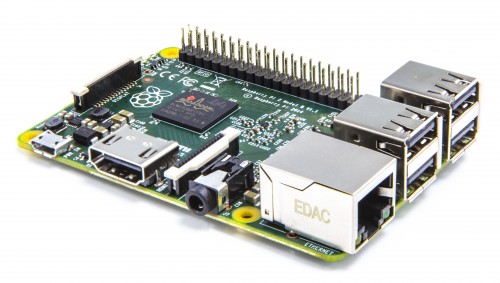

Raspberry Pi 2 on sale now at $35
Eben Upton


Let’s get the good stuff out of the way above the fold. Raspberry Pi 2 is now on sale for $35 (the same price as the existing Model B+), featuring:
  • A 900MHz quad-core ARM Cortex-A7 CPU (~6x performance)
  • 1GB LPDDR2 SDRAM (2x memory)
  • Complete compatibility with Raspberry Pi 1
Because it has an ARMv7 processor, it can run the full range of ARM GNU/Linux distributions, including Snappy Ubuntu Core, as well as Microsoft Windows 10.
...
Raspberry Pi 2 is available to buy today from our partners element14 and RS Components. Remember you’ll need an updated NOOBS or Raspbian image including an ARMv7 kernel and modules from our downloads page. At launch, we are using the same ARMv6 Raspbian userland on both Raspberry Pi 1 and 2; over the next few months we will investigate whether we can obtain higher performance from regular ARMv7 Debian, or whether we can selectively replace a small number of libraries to get the best of both worlds. Now that we’re using an ARMv7 core, we can also run Ubuntu: a Snappy Ubuntu Core image is available now and a package for NOOBS will be available in the next couple of weeks.




sexta-feira, 12 de outubro de 2012

Notícias e Instructables

Vamos a isto, que é muita coisa, o Programa grátis de 3D 123D pode preparar os vossos Objectos para Impressão 3D, e eis como...
Aconselho vivamente a que façam o Download deste Instructable como Pdf, para terem à mão, é um pequeno Manual por si próprio.
Eu já descarreguei, vejam vocês o Instructable:


123D Modeling for 3D Printing
sath02 
I got a chance to play with Autodesk's 123D application. I spent some times to get myself familiar with 123D, and found that it was very easy to use with a lot of features that I could use to create a professional quality 3D models.

This hands-on tutorial is written for anyone who want to make 3D Print.
In this tutorials, you will learn to use 123D through a series of hands-on exercises.

After reading this tutorial, you can use 123D to visualize designs of the things that will actually be built. You will be guided through the basics of 3D manipulation in 123D, and the principal ideas involved in displaying complex 3D objects, and will be ready to create the simple objects that will get you that first 3D Printing object. You will learn how to save and export files directly from 123D program to send to fabricator, such as  "Free 3D Printing" Group or anyother 3D Fabricators.


Boas notícias para a Exploração do Espaço, o DragonX já fez uma Docagem!


Dragon achieves first commercial docking with ISS

David Szondy

Spacex’s unmanned Dragon spacecraft successfully docked with the International Space Station (ISS) at 9:03 AM EDT (1303 GMT) today. Marking the beginning of a new era of commercial space travel, the privately owned and operated cargo vehicle was captured at 6:56 AM EDT (1056 GMT) by one of the station’s robotic arms operated by Expedition 33 crew member Akihiko Hoshide of the Japan Aerospace Exploration Agency (JAXA) and Expedition 33 Commander Sunita Williams of NASA. It was then guided to a docking port where it will remain attached for the next three weeks.


E temos este Projector da 3M, que pjojecta Vídeo em directo pla Net...


New 3M projector streams Roku content

Dave LeClair

The world seems to be moving away from projectors. Almost all of the tech-savvy consumer's content is downloaded digitally and streamed to TVs, tablets and smartphones. The projector is kind of lost in the shuffle of all of this. Enter 3M's Streaming Projector, which merges the massive display sizes that only a projector can produce, with the streaming content for which Roku is known.
This projector is tiny, which is in keeping with the trend in personal electronics today. It is small enough to fit in the palm of your hand and weighs in at about a pound. It is capable of projecting an image of up to 120 inches, and it can place these images just about anywhere. The 3M Streaming Projector has a resolution of 800 x 480, which will not blow away the hardcore HD junkies, but it is quite impressive when you consider the size of the device.


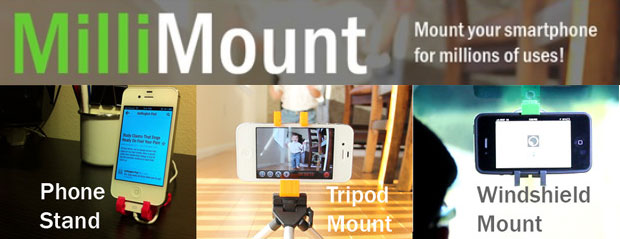
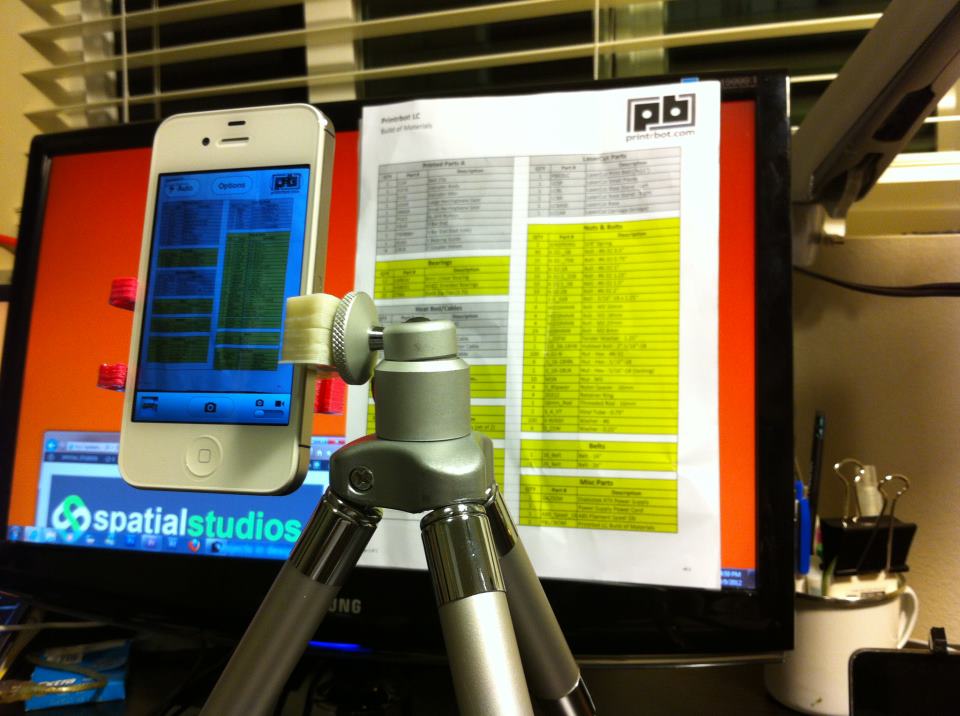
E que tal um tripé para os vossos Smart Phones, que também dá para os montar no vosso Carro?


MilliMount smartphone mount prototyped with Ponoko, launches Kickstarter campaign

MilliMount, an expandable smartphone mount that recently launched on Kickstarter, was prototyped early on using Ponoko’s 3D printing service.
If funding is successful, the combination phone stand/tripod mount/windshield mount will be manufactured through traditional means. But during development, Spatial Studios used one of the great strengths of 3D printing: iteration. That enabled creator Randy Ganacias to make changes over and over until the design was declared finished.


E Portugal ganha acesso a Tecnologia Espacial, muito bom!


Portugal ganha nova tecnologia para conquistar o Espaço


Chama-se Iniciativa Nacional de Transferência de Tecnologia Espacial e acaba de ser lançada pela Agência Espacial Europeia para projetar as empresas portuguesas do sector no mercado mundial.
Reforçar a competitividade da indústria espacial portuguesa e promover a inovação tecnológica, apoiando e facilitando a transferência de tecnologia espacial já disponível para sectores não espaciais, é o objetivo da Iniciativa Nacional de Transferência de Tecnologia Espacial (PTTI), lançada hoje em Lisboa pela ESA, Agência Espacial Europeia.
Este programa de transferência de tecnologia para Portugal é feito pela Agência Espacial Europeia em colaboração com a Fundação para a Ciência e a Tecnologia (FCT), estando o seu desenvolvimento a cargo do Instituto Pedro Nunes, a incubadora de empresas da Universidade de Coimbra.
O lançamento insere-se no workshop temático dedicado aos Programas Tecnológicos da ESA, organizado pelo Gabinete do Espaço da FCT, de preparação para a próxima reunião interministerial da ESA, e contou com a participação de Franco Ongaro, diretor dos Programas Tecnológicos da ESA, e de Carlos Oliveira, secretário de Estado do Empreendedorismo, Competitividade e Inovação, entre outros.
A ESA já transferiu mais de 200 tecnologias espaciais para vários países da Europa, que permitiram a criação de várias empresas com projeção nos mercados internacionais.


quarta-feira, 8 de fevereiro de 2012

Sketchup foto-realista, em Realidade Aumentada, e em Carpintaria!

Eis um post cheio de Sketch, e vale a pena:

Um plug-in que vos dá uma imagem foto-realista!


SU Walk: Photorealistic animations for SketchUp

Sometimes a SketchUp model is only as good as its presentation. Users often take advantage of render plugins to add realism and detail to their work. But to truly illustrate the power of a 3D model, nothing beats a video. To that end, Cadalog, Inc., the makers of SU Podium (a popular render plug-in) have introduced a new plugin, SU Walk.
With SU Walk, you can create beautiful, photorealistic animations from your SketchUp models. Key features include:
  • Photorealism. Apply reflections and lights directly inside SketchUp.
  • Keyframe animations. Export a variety of formats including .mp4 and .avi.
  • Weather environments. Choose from clear sky, moving clouds, rain, fog, even moonlight to add realism to your animation.
  • Speed. Polygon reduction makes camera movement in the scene very fast.
http://sketchupdate.blogspot.com/2011/12/su-walk-photorealistic-animations-for.html


E que tal... Realidade Aumentada,. para verem as vossas Criações em 3D, nos vossos I-Pads?


3DOn ARchitecture: Augmented Reality for iOS devices
Thursday, December 22, 2011 1:00 AM

Paul from 3DOn Ltd. presented at an event I attended a month or so ago. After his presentation, I asked him if we could tell the SketchUp community about his product, 3DOn ARchitecture. He said yes, but at the time the app was only available in the UK. Now it’s available to SketchUp users all over the world. Hooray!


E atenção, Designers de Mobiliário, podem mandar fazer os vossos planos no mundo real, cortesia deste novo Site:


CustomMade: A community design marketplace

Here’s an interesting twist on our Make Ideas Real project: sometimes great designs aren’t your ideas. The good folks at CustomMade.com have developed a marketplace that connects roll-up-your-sleeve makers with people who have project ideas they want to bring to life. (Editor's Note: CustomMade is part of the Google Ventures portfolio.) Have an idea for a one-of-a-kind armoire? On CustomMade there are about 3,000 contractors who can help you bring that idea to life.

http://sketchupdate.blogspot.com/2012/01/custommade-community-design-marketplace.html


Portanto, meus amigos, já vos dei 3 boas razões para se tornarem fâs do Sketchup Blog!
Vão lá:
http://sketchupdate.blogspot.com/

domingo, 17 de julho de 2011

Rodas dentadas!!!

Estava marreco de tentar encontrar uma maneira decente de fazer Rodas Dentadas, para Impressão 3D, ou Corte 2D...
E encontrei!
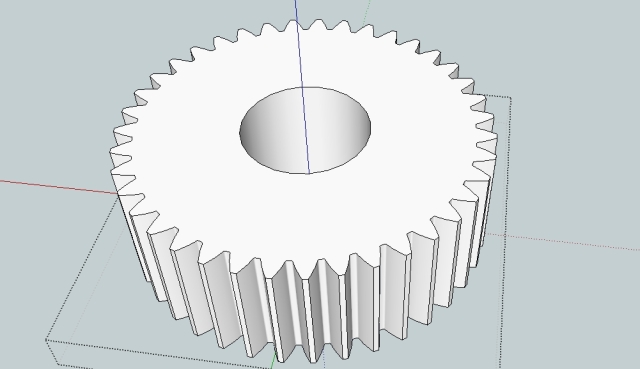
Eis, do Site Capolight Electronics Projects, como fazer uma Roda Dentada, Roda Dentada, MESMO...


Drawing gears in Sketchup.
Posted on January 22, 2011 by Richard

The following is a guide for designing gears in sketchup for 3D printing, CNC milling or similar. For a good introduction in general gear design see here. For an introduction to sketchup see the sketchup related links this page.

A collection of the gears seen in this page can be downloaded from the 3d warehouse.

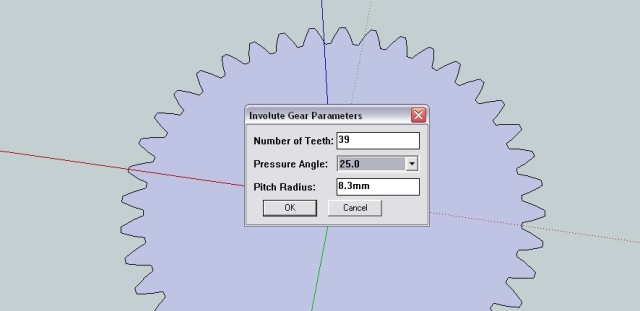
To begin with, download the involute gear plugin and copy it to your sketchup plugin directory. This plug-in was not produced by me and all credit goes to Cadalog Inc for writing this very useful tool. Then open sketchup and choose ‘Involute Gear’ from the draw menu. From the dialogue box you are presented with three options.

A partir do Google Sketchup, e podem-se fazer toda uma data de rodas dentadas, direitas, a 45º, torcidas, dentes para dentro...

É bom!